When Reuse Becomes Coupling
Practice · 2026-10-23
A practical look at how reuse can turn into coupling when shared code, models, helpers, or abstractions connect contexts that should change independently.
When Reuse Becomes Coupling
1. Introduction: Reuse Is Not Always a Design Improvement
Reuse is often treated as an automatic good.
If two pieces of code look similar, it is tempting to remove the duplication. A helper method is extracted. A shared model is introduced. A common service is created. A generic abstraction is added. The code becomes shorter, and the duplication disappears.
At first, that can feel like an improvement.
There is less code to maintain. A bug can be fixed in one place. A rule can be applied consistently. A repeated pattern gets a name. The system appears cleaner.
Sometimes that is exactly the right outcome.
Good reuse can reduce noise. It can make intent clearer. It can prevent the same decision from being implemented several different ways. It can give a common concept one clear owner.
But reuse is not free.
When code is reused, the things that use it become connected. A change made for one caller can affect another caller. A decision made for one context can start shaping another context. A model created for one workflow can become a dependency in a different workflow. A helper that once removed duplication can gradually become a place where unrelated needs are negotiated.
That is when reuse starts becoming coupling.
The problem is not sharing code.
The problem is sharing code before understanding whether the callers really share the same meaning.
Two pieces of code may look similar because they express the same concept.
They may also look similar because two different concepts happen to require the same steps today.
Those are not the same thing.
If two workflows both check an email address, format a title, calculate a date, validate a status, or map a result, it may be reasonable to reuse part of the implementation. But it is also possible that the workflows have different reasons for doing similar work.
If those reasons change independently, the shared code becomes a point of friction.
One caller needs a small exception. Another caller needs a different rule. A third caller needs the old behavior. The shared abstraction grows options, flags, special cases, nullable parameters, callback hooks, or vague names that try to keep everyone satisfied.
The code is still reused.
But it is no longer simple.
The shared code has become a negotiation between contexts.
That kind of coupling is easy to create because reuse often looks responsible. Developers are taught to avoid duplication, and repeated code can indeed become a maintenance problem. But duplication is only one kind of cost.
Coupling is another.
A little duplication may be easier to understand than a shared abstraction that hides different reasons to change.
This matters especially in application design, where code is not only a set of instructions. It is also a way of expressing decisions, workflows, rules, policies, and outcomes.
When reuse preserves that meaning, it helps.
When reuse hides that meaning, it hurts.
The goal is not to reject reuse.
The goal is to treat reuse as a design decision, not only as a cleanup step.1
Before extracting shared code, it is useful to ask what is actually being shared:
Are these callers using the same concept, or do they only look similar right now?
That question changes the discussion.
It moves reuse away from surface-level similarity and toward application meaning.
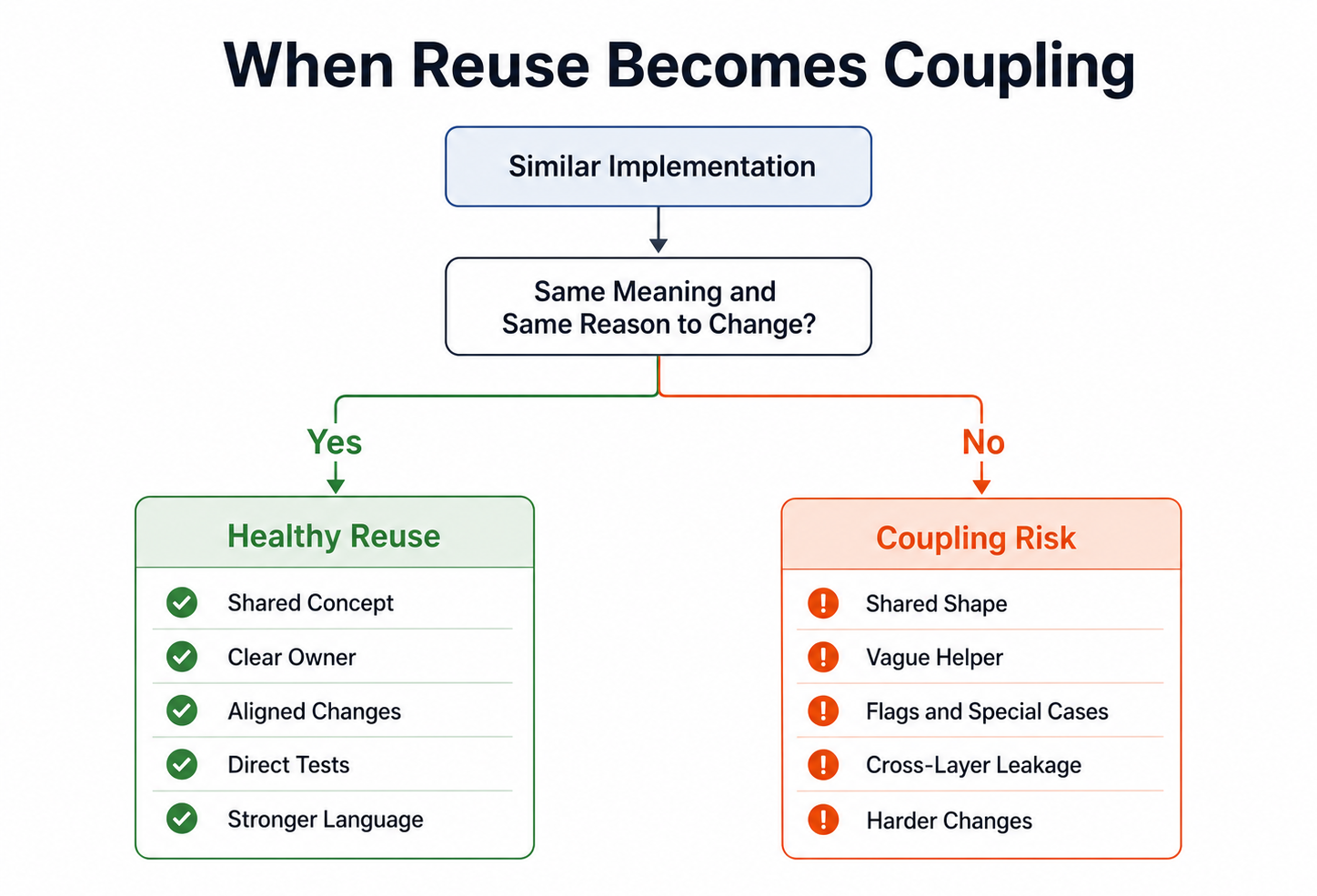
Reuse is healthiest when callers share meaning, not only implementation shape.
This article looks at practical situations where reuse can become coupling: shared reasons to change, different contexts, generic helpers, shared models, cross-layer reuse, and premature abstractions. It also looks at why some duplication can be cheaper than the wrong abstraction, and how to improve reuse boundaries gradually.
Reuse can make a system clearer.
But only when it connects things that truly belong together.
2. Shared Code Creates Shared Reasons to Change
When code is shared, the callers become connected.
That connection may be useful.
If the callers depend on the same concept, shared code can give that concept one clear place to live. A change to the concept can then be made once, tested once, and applied consistently.
For example, if several parts of an application need to know whether a license has expired, it may be sensible to express that rule in one place:
public bool HasExpired(DateTimeOffset now)
{
    return ExpiresAt <= now;
}
If expiration means the same thing everywhere, the reuse is helpful.
The shared code represents shared meaning.
But shared code also creates a shared reason to change.
Every caller that depends on the code is affected by its future shape. The method signature, return value, assumptions, validation rules, exception behavior, and naming all become part of a small contract.
That contract may be intentional.
It may also be accidental.
Accidental coupling often appears when shared code is extracted only because two implementations look similar.
For example:
public static bool IsReady(string title, string content)
{
    return !string.IsNullOrWhiteSpace(title) &&
           !string.IsNullOrWhiteSpace(content);
}
At first, this may seem harmless.
Several workflows need to know whether something has a title and content. The repeated condition is removed. The rule has one implementation.
But the name IsReady is vague.
Ready for what?
Ready to publish? Ready to preview? Ready to archive? Ready to send for review? Ready to display in an admin list?
Those questions matter because each workflow may change for a different reason.
Publishing may require a title, content, author, section, and scheduled date.
Previewing may require only content.
Archiving may not require content at all.
Sending for review may require content and an assigned reviewer.
If all those workflows depend on the same IsReady method, a change for one workflow can accidentally affect the others.
That is coupling.
The duplication was removed, but the reasons to change were merged.
A clearer design may allow similar-looking checks to remain separate until their meaning is better understood:
public bool CanBePublished()
{
    return !string.IsNullOrWhiteSpace(Title) &&
           !string.IsNullOrWhiteSpace(ContentMarkdown);
}
and elsewhere:
public bool CanBePreviewed()
{
    return !string.IsNullOrWhiteSpace(ContentMarkdown);
}
These methods may share some implementation details internally later.
But they do not pretend to be the same decision.
Their names preserve the reason behind the check.
That is usually more important than removing every repeated condition.
Shared code becomes especially risky when callers start asking for small variations.
One caller needs the method to ignore archived items.
Another caller needs archived items included.
One caller wants exceptions.
Another caller wants result objects.
One caller needs case-sensitive comparison.
Another caller needs case-insensitive comparison.
At that point, the shared code may begin to grow parameters:
public static bool IsReady(
    string title,
    string content,
    bool allowEmptyContent,
    bool includeArchived,
    bool requireReviewer)
{
    // Shared logic with several caller-specific branches.
}
This method may still reduce duplication.
But it also hides the fact that different callers have different rules.
The flags are a signal that the shared abstraction may no longer represent one concept.
It may represent several concepts forced into one place.
A useful warning sign is when a change request sounds like this:
Can we change the shared method for this screen, without affecting the other places that use it?
That question often means the reuse boundary is wrong.
The code is shared, but the reasons to change are not.
In those cases, separating the code can make the system clearer.
That separation may look like duplication at first.
But it can also restore independent change.
Two workflows can evolve separately. Their names can reflect their own meaning. Their tests can describe their own behavior. A change in one place does not create hidden risk in another.
That does not mean shared code should be avoided.
It means shared code should represent shared meaning.
A useful question is:
If this code changes, should all current callers change with it?
If the answer is yes, reuse is probably healthy.
If the answer is no, the shared code may be coupling unrelated decisions together.
Reuse removes duplication.
But it also connects the future of the callers.
That connection should be deliberate.
3. Reuse Becomes Risky When Contexts Are Different
Reuse is safest when the callers share the same context.
If the same rule, concept, or workflow decision is needed in several places, shared code can make the system clearer. The shared code gives that concept one name and one owner.
But when the contexts are different, reuse becomes riskier.
The code may look similar, but the meaning may not be the same.
For example, several parts of a system may need to validate an email address. At first, that sounds like one reusable rule. An email address is either valid or invalid.
But the context may matter.
A newsletter signup may only need to know whether the address looks syntactically valid.
A license restore workflow may need to know whether the address belongs to an existing customer.
A billing flow may need a verified address.
An admin search form may allow partial input.
A support form may accept an email address as optional contact information.
Those workflows may all involve an email address.
They do not necessarily share the same rule.
If they all use the same helper, the helper can gradually become confused:
public static bool IsValidEmail(
    string? email,
    bool allowEmpty,
    bool requireVerified,
    bool allowPartialMatch)
{
    // Several contexts forced into one method.
}
The problem is not only that the method has several parameters.
The deeper problem is that the method no longer represents one clear application idea.
It represents a compromise between several contexts.
That kind of reuse often starts innocently.
A developer sees similar validation in two places and extracts it. Later, a third caller needs a variation. Then a fourth caller needs another variation. The helper grows because it is already shared, and changing the call sites feels more expensive than adding one more option.
The result is shared code that every caller depends on, but no caller fully owns.
That makes change harder.
It also makes the code harder to read.
When a caller invokes the method, the reader must understand not only the method name, but also the meaning of the selected flags:
var isValid = EmailValidator.IsValidEmail(
    email,
    allowEmpty: true,
    requireVerified: false,
    allowPartialMatch: false);
The call is technically explicit.
But it still forces the reader to ask why those options are correct for this workflow.
A clearer approach is often to name the context directly:
var result = await _newsletterSignupService.SignUpAsync(
    new NewsletterSignupRequest(email),
    ct);
or:
var result = await _licenseRestoreService.RestoreAsync(
    new RestoreLicenseRequest(email),
    ct);
Each workflow can still reuse lower-level technical checks if they are genuinely shared.
But the application rule remains owned by the context that needs it.
That distinction matters.
A reusable email syntax check may be fine:
public bool HasValidEmailSyntax(string email)
{
    // Technical format check.
}
But whether an email address is acceptable for newsletter signup, license restore, billing, support, or admin search is an application decision.
Those decisions may change independently.
Context also matters with data shape.
Two screens may display an article title, date, and status. That does not automatically mean they should use the same view model.
One screen may be a public article list. Another may be an admin publishing queue. A third may be an internal dashboard.
The data looks similar today.
But the reasons for change are different.
The public list may change because of reader experience.
The publishing queue may change because of editorial workflow.
The dashboard may change because of operational reporting.
If all three screens share the same model only because the properties overlap, the model may become a coupling point. A property added for one screen appears everywhere. A formatting decision for one view affects another. A status that matters internally leaks into a public context.
The shared model becomes convenient in the short term and restrictive in the long term.
A useful question is:
Do these callers change for the same reason, or do they only use similar data today?
If they change for the same reason, reuse may be appropriate.
If they change for different reasons, separate models or separate methods may be clearer, even if they contain some duplication.
Different contexts often deserve different language.
For example, a public article may be “visible”.
An admin article may be “editable”.
A scheduled article may be “publishable”.
A deleted article may be “restorable”.
Those words may depend on some of the same fields, but they do not mean the same thing.
If they are all collapsed into a generic IsActive property, the code may become shorter, but the application language becomes weaker.
That is a common sign that reuse has gone too far.
Healthy reuse respects context.
It does not force different workflows to share one name simply because they currently use similar code.
Sometimes the right design is to duplicate a small amount of implementation so that each context can keep its own meaning.
That duplication may feel uncomfortable at first.
But it can make future change simpler because each workflow remains free to evolve according to its own needs.
Reuse becomes risky when it connects contexts that do not actually belong together.
Before sharing code, it is worth asking not only whether the code is similar, but whether the context is the same.
4. Similar Code Is Not Always the Same Concept
Similar code is one of the most common reasons developers introduce reuse.
That is understandable.
When two blocks of code look almost the same, they create discomfort. It feels wasteful to keep both. It feels cleaner to extract the shared parts into one method, one class, one model, or one service.
Sometimes that instinct is correct.
But visual similarity is not enough.
Two pieces of code can look the same while representing different concepts.
For example:
public bool CanPublish()
{
    return !string.IsNullOrWhiteSpace(Title) &&
           !string.IsNullOrWhiteSpace(ContentMarkdown);
}
and:
public bool CanSendForReview()
{
    return !string.IsNullOrWhiteSpace(Title) &&
           !string.IsNullOrWhiteSpace(ContentMarkdown);
}
These methods currently contain the same implementation.
It may be tempting to replace both with a shared helper:
public static bool HasTitleAndContent(
    string title,
    string content)
{
    return !string.IsNullOrWhiteSpace(title) &&
           !string.IsNullOrWhiteSpace(content);
}
That helper is not necessarily wrong.
But the extraction changes what the code emphasizes.
Before the extraction, the code named two application concepts: publishing and sending for review.
After the extraction, the code names a technical condition: having a title and content.
That may be a step backward if the two operations can change independently.
Publishing may later require a section, a scheduled date, or editor approval.
Review may later require an assigned reviewer, a comment, or a different status.
The code looked the same because the rules were the same today.
But the concepts were not necessarily the same.
That distinction is important.
Code can be duplicated in implementation without being duplicated in meaning.2
If the meaning is different, removing the implementation duplication too early can make the design less clear.
The same issue appears with status checks.
Two workflows may both check whether an item is not archived:
if (!article.IsArchived)
{
    // Show article.
}
and:
if (!article.IsArchived)
{
    // Allow editing.
}
The condition is the same.
But the concepts may be different.
One question is about visibility.
The other is about editability.
If both checks are replaced with a generic IsActive property, the code may become shorter, but the application language becomes weaker:
if (article.IsActive)
{
    // What does active mean here?
}
“Active” may now mean visible, editable, publishable, restorable, billable, enabled, or simply not archived.
That ambiguity often appears when reuse is based on similarity rather than meaning.
A better design may keep separate names, even if the implementation overlaps:
public bool IsVisibleToReaders()
{
    return !IsArchived;
}
and:
public bool CanBeEdited()
{
    return !IsArchived;
}
These methods may look redundant.
But they protect meaning.
If visibility later depends on publication date, while editability depends on user permissions or workflow state, the methods can change independently.
The earlier duplication made that possible.
This does not mean implementation details can never be shared.
Sometimes a lower-level helper is useful.
But it should not replace the application-level name.
For example, both methods could use the same private helper if that improves readability:
private bool HasRequiredContent()
{
    return !string.IsNullOrWhiteSpace(Title) &&
           !string.IsNullOrWhiteSpace(ContentMarkdown);
}

public bool CanPublish()
{
    return HasRequiredContent();
}

public bool CanSendForReview()
{
    return HasRequiredContent();
}
This keeps the shared implementation local while preserving the different application concepts.
The reader can still see that publishing and review are separate decisions.
That is usually more important than eliminating every repeated expression.
Similar code can also appear across layers.
A page model, application service, and repository may all contain checks that look alike. That may indicate duplication. It may also indicate that each layer is asking a different question.
The page may ask whether to show a button.
The application service may ask whether the operation is allowed.
The repository may ask which records match a storage query.
Those questions may use some of the same data, but they are not the same responsibility.
Forcing them into one shared method can blur the boundary between presentation, workflow, and persistence.
A useful question is:
If these two pieces of code change differently later, would the shared abstraction still make sense?
If the answer is no, the similarity may be accidental.
In that case, keeping the code separate is not necessarily poor design.
It may be a way of preserving independent meaning.
The goal is not to ignore duplication.
Repeated code can still be a problem. It can hide bugs, create inconsistency, and make changes harder.
But duplication should be judged by meaning, not only by appearance.
Before extracting shared code, ask what would be lost by the extraction.
If the extraction removes repetition but also removes useful language, it may not be an improvement.
Similar code is a signal.
It is not proof that the concept is the same.
5. Generic Helpers Can Hide Application Meaning
Generic helpers often begin as a practical cleanup.
A few lines of repeated code appear in several places. The code is moved into a shared method. The method gets a broad name. The duplication disappears.
At first, that can be useful.
A helper can remove technical noise. It can make repeated low-level operations easier to read. It can prevent small implementation details from being repeated everywhere.
For example, a helper that normalizes whitespace may be perfectly reasonable:
public static string NormalizeWhitespace(string value)
{
    return string.Join(" ", value.Split(StringSplitOptions.RemoveEmptyEntries));
}
This helper has a clear technical purpose.
It does not pretend to own an application decision. It simply performs a small operation that can be reused in several places.
The risk appears when helpers begin to hide application meaning.
For example:
public static bool IsValid(string value)
{
    return !string.IsNullOrWhiteSpace(value) &&
           value.Length <= 200;
}
This method may be reusable, but it is also vague.
Valid for what?
A title? A customer name? A search query? A license key? A feedback message? A tag? A file name?
The method name does not say.
The caller may know what it means today, but the meaning is no longer visible in the code. The application concept has been replaced by a generic validation helper.
A more expressive version may be slightly less reusable, but easier to understand:
public static bool IsValidArticleTitle(string title)
{
    return !string.IsNullOrWhiteSpace(title) &&
           title.Length <= 200;
}
This method is less generic.
That is the point.
It says what the rule belongs to.
It also gives the rule a clearer reason to change. If article titles later allow 250 characters, that change does not automatically imply that every other string with a maximum length should change as well.
Generic helpers are especially tempting when the code is simple.
For example:
public static bool IsEmpty(string? value)
{
    return string.IsNullOrWhiteSpace(value);
}
There is nothing wrong with a helper like this if it improves readability in a specific codebase.
But helpers can also create a layer of vocabulary that does not add much meaning. If a helper only renames a language or framework feature without clarifying intent, it may make the code less direct.
This is especially true when helper names become broad and abstract:
ValidateInput();
ProcessData();
HandleItem();
ApplyRules();
CheckStatus();
PrepareResult();
Names like these may sound reusable, but they often hide the real question.
What input?
Which data?
What item?
Which rules?
What status?
What result?
The broader the helper name, the more careful the design should be.
A generic name may indicate that the code has been extracted before the concept was understood.
Another warning sign is when a helper grows optional behavior.
For example:
public static string FormatDisplayText(
    string value,
    bool trim,
    bool removeLineBreaks,
    bool convertToTitleCase,
    bool allowEmpty)
{
    // Formatting logic for several callers.
}
The method is reusable, but the options reveal something important.
Different callers want different behavior.
Some may be formatting article titles. Others may be formatting customer names, UI labels, report headings, or file names. Those contexts may have different rules, even if the implementation overlaps today.
The helper now carries several contexts without naming them.
That is a form of coupling.
A better approach may be to keep application-level names at the call site:
var title = ArticleTitleFormatter.Format(input.Title);
or:
var displayName = CustomerDisplayNameFormatter.Format(customer);
These names are less generic, but they preserve intent.
They also allow the rules to change independently.
Generic helpers can be useful near technical edges.
String cleanup, date conversion, collection operations, path handling, encoding, parsing, serialization support, and small formatting utilities may all belong in reusable helpers when their behavior is genuinely technical and stable.
But application decisions deserve more specific names.
A useful distinction is:
Technical helpers can be generic. Application rules should usually be specific.
That distinction prevents a common mistake: hiding business meaning behind utility language.
For example, this call tells the reader very little:
if (ValidationHelper.IsValid(article.Title))
{
    // Continue.
}
This call is more direct:
if (article.HasValidTitle())
{
    // Continue.
}
And this may be clearer still, if the rule belongs to a workflow:
if (article.CanBePublished())
{
    // Continue.
}
Each version may use similar implementation internally.
But they communicate different levels of meaning.
The important question is not only whether the code can be reused.
The important question is whether reuse makes the application easier to understand.
A useful question is:
Does this helper reveal the application concept, or does it hide it?
If the helper reveals intent, it can improve the design.
If it hides intent, it may only make the code shorter.
Shorter code is not always clearer code.
Generic helpers should remove noise.
They should not remove meaning.
6. Shared Models Can Couple Workflows Together
Shared models are one of the easiest places for reuse to become coupling.
A model starts with a few common properties. Several workflows need those properties, so the model is reused. At first, this can feel efficient. The same data shape can move through several parts of the application. Less mapping is needed. Fewer classes need to be created. The code looks simpler.
Sometimes that is reasonable.
If several parts of the system truly work with the same concept, a shared model can make that concept clearer.
But shared models can also connect workflows that should be allowed to change independently.
For example, an article model may begin like this:
public sealed class ArticleModel
{
    public string Id { get; init; } = string.Empty;
    public string Title { get; init; } = string.Empty;
    public string Summary { get; init; } = string.Empty;
    public DateTimeOffset PublishedAt { get; init; }
}
This may be useful for a public article list.
Later, the same model is reused in the admin publishing queue because it already contains the title, summary, and date. Then it is reused in a dashboard because the dashboard also needs article information. Then it is reused in an export because the shape is already available.
The model has become convenient.
But the contexts are different.
The public list changes because of reader experience.
The admin queue changes because of editorial workflow.
The dashboard changes because of reporting needs.
The export changes because of integration requirements.
Those are different reasons to change.
As each context adds what it needs, the shared model grows:
public sealed class ArticleModel
{
    public string Id { get; init; } = string.Empty;
    public string Title { get; init; } = string.Empty;
    public string Summary { get; init; } = string.Empty;
    public DateTimeOffset PublishedAt { get; init; }
    public bool IsPublished { get; init; }
    public bool IsArchived { get; init; }
    public string? InternalNotes { get; init; }
    public string? ReviewStatus { get; init; }
    public int ViewCount { get; init; }
    public bool CanEdit { get; init; }
    public bool CanDelete { get; init; }
}
The model still works.
But it no longer clearly belongs to one workflow.
Some properties are public-facing. Some are administrative. Some are reporting details. Some are permissions. Some are workflow state. Some may only be meaningful for one screen.
That makes the model harder to understand.
It also makes it easier for information to leak into places where it does not belong.
A public page may receive internal fields it should not care about. A dashboard may depend on editorial workflow details. An export may accidentally include data that was added for an admin screen. A test may need to populate properties that are irrelevant to the behavior being tested.
The shared model has become a coupling point.
A clearer design often uses different models for different purposes, even when some properties overlap:
public sealed class PublicArticleSummary
{
    public string Title { get; init; } = string.Empty;
    public string Summary { get; init; } = string.Empty;
    public DateTimeOffset PublishedAt { get; init; }
}

public sealed class ArticlePublishingQueueItem
{
    public string Id { get; init; } = string.Empty;
    public string Title { get; init; } = string.Empty;
    public string ReviewStatus { get; init; } = string.Empty;
    public bool CanEdit { get; init; }
}
These models duplicate some fields.
That duplication is not automatically a problem.
The models answer different questions.
One model describes what a reader needs to see.
The other describes what an editor needs to act on.
The overlap in data does not mean the concepts are the same.
Shared models become especially risky when they cross architectural boundaries.
A persistence entity may be reused as an API response.
An API contract may be reused as a domain object.
A UI view model may be passed into an application service.
A database model may become the shape used by several workflows because it already has all the fields.
That can reduce mapping in the short term.
But it also pulls details across boundaries.
Persistence concerns can leak into the UI.
Transport concerns can leak into the application layer.
Presentation needs can influence domain objects.
Database columns can start shaping workflow language.
At that point, the shared model is no longer just a data container.
It is carrying assumptions from one part of the system into another.
Mapping between models can feel repetitive, but it often has a useful purpose.
It marks a boundary.
It says that one part of the system has translated its data into the language needed by another part.
For example:
public PublicArticleSummary ToPublicSummary(Article article)
{
    return new PublicArticleSummary
    {
        Title = article.Title,
        Summary = article.Summary,
        PublishedAt = article.PublishedAt
    };
}
This mapping is simple.
But it makes the boundary visible.
The public article list receives only the data it needs, expressed in the shape it expects.
The application can later change the persistence model, admin model, or internal workflow without forcing the public model to change at the same time.
That independence is often worth the small amount of mapping code.
A useful question is:
Does this model represent one concept, or is it serving several unrelated callers?
If the model represents one concept, sharing it may be healthy.
If it is serving several contexts with different reasons to change, it may be coupling those contexts together.
Another useful question is:
Would I still design this model this way if each caller were built separately?
If the answer is no, the model may have become shared mainly because it was already available.
That kind of reuse is convenient, but it can make the system harder to change later.
Shared models should make common meaning visible.
They should not become containers for every field that several callers happen to need.
7. Reuse Across Layers Can Pull Details in the Wrong Direction
Reuse becomes especially risky when it crosses architectural layers.3
Within one layer, shared code may still create coupling, but the coupling is often easier to see. A shared view model used by several screens, a shared repository method used by several queries, or a shared validator used by several workflows can usually be discussed in terms of that layer’s responsibilities.
Across layers, the problem becomes more subtle.
A type, helper, or abstraction may start in one layer because it solves a local problem. Later, another layer reuses it because it is already available. That reuse may reduce code in the short term, but it can also pull details in the wrong direction.
For example, a persistence entity may be reused directly in a web page:
public async Task<IActionResult> OnGetAsync(
    string id,
    CancellationToken ct)
{
    Article = await _dbContext.Articles.SingleOrDefaultAsync(
        article => article.Id == id,
        ct);

    return Page();
}

public Article Article { get; private set; } = default!;
This may feel efficient.
The entity already contains the data. The page needs to display that data. No extra model is required.
But the page now depends directly on the persistence shape.
If the entity contains navigation properties, persistence attributes, internal workflow state, concurrency fields, or database-specific assumptions, those details are now part of the page’s world. The UI may begin to depend on properties that exist because of storage, not because of presentation.
The dependency has moved in the wrong direction.
The presentation layer is now shaped by persistence.
The same problem can happen in the other direction.
A UI model may be passed into an application service because it already contains the values submitted from a form:
public async Task<IActionResult> OnPostAsync(CancellationToken ct)
{
    var result = await _articleService.PublishAsync(Input, ct);

    return ToActionResult(result);
}
If Input is a Razor Page input model, the application service now depends on a web-specific shape. It may inherit validation attributes, binding assumptions, display names, or optional properties that exist for the page rather than for the use case.
The application layer is now shaped by the web framework.
That may not seem serious in a small feature.
But over time, it makes reuse harder in the wrong places.
A desktop application, API endpoint, background job, command-line tool, or test may want to call the same operation. If the operation expects a web input model, those callers must either construct a web-shaped object or introduce special adapters around a type that should never have been part of the application boundary.
A clearer design uses an application request type:
public sealed record PublishArticleRequest(string ArticleId, string UserId);
The Razor Page can translate its input into that request:
var result = await _articleService.PublishAsync(
    new PublishArticleRequest(Input.ArticleId, CurrentUserId), ct);
The page still owns binding and presentation concerns.
The application service owns the use case.
The request type belongs to the application language rather than the web framework.
Reuse across layers can also appear through helper methods.
For example, a UI helper may format status text:
public static string FormatStatus(Article article)
{
    return article.IsPublished ? "Published" : "Draft";
}
Later, the same helper may be used in an export, an email, an API response, or an admin report.
At first, this seems harmless. The status text is reused.
But the helper may carry presentation assumptions: wording, capitalization, localization, formatting, or display ordering. Those assumptions may be correct for the UI but wrong for another boundary.
An API may need a stable status code.
An export may need a column value.
An email may need user-facing text.
An admin report may need a more detailed workflow state.
Sharing one formatter can make those needs harder to separate.
The issue is not the formatting itself.
The issue is that presentation language has become shared application language by accident.
A similar problem appears when infrastructure abstractions are reused inside application logic.
For example, a use case may return an HTTP result because most callers are web endpoints:
public async Task<IActionResult> RestoreLicenseAsync(
    RestoreLicenseInput input,
    CancellationToken ct)
{
    // Restore license.
}
This makes the web layer convenient.
But it also makes the application service web-specific.
The use case now speaks in HTTP responses instead of application outcomes. A background job or desktop application must understand web concepts to call a license restore operation.
A better boundary usually returns an application result:
public async Task<RestoreLicenseResult> RestoreLicenseAsync(
    RestoreLicenseRequest request,
    CancellationToken ct)
{
    // Restore license.
}
Then each delivery mechanism can translate the result into its own form.
The web layer can return an HTTP status code.
A desktop application can show a dialog.
A background job can log the result and continue.
A test can assert the exact failure reason.
The application result remains independent of the layer that delivers it.
A useful rule is:
Reuse should not force an inner layer to depend on an outer layer.
Application code should not depend on UI models, HTTP results, Razor Page input types, controller-specific concerns, or persistence framework details just because those types are convenient.
That does not mean every layer needs many separate classes for every small operation.
Simple applications can reasonably share some shapes when the cost of separation is higher than the benefit.
But when a type crosses a boundary, it is worth asking what assumptions it brings with it.
- Does it contain persistence concerns?
- Does it contain presentation concerns?
- Does it contain transport concerns?
- Does it contain framework attributes?
- Does it force callers to understand a layer they should not care about?
Those questions help identify whether reuse is preserving meaning or pulling details across boundaries.
Cross-layer reuse can be tempting because mapping looks like waste.
Creating a request object, response object, view model, or persistence model can feel like extra code when the fields are almost the same.
But mapping is not only copying.
Mapping is translation.
It protects each layer’s language from being shaped too strongly by another layer’s needs.
A useful question is:
Is this reuse moving information across a boundary, or is it moving responsibility across a boundary?
Moving information is normal.
Moving responsibility is dangerous.
A web page may pass an article id to an application service.
A repository may return data needed by a use case.
A use case may return a result that a UI can display.
Those are healthy translations.
But if the web page passes its input model as the command, the repository returns its persistence entity as the public model, or the use case returns an HTTP response, responsibility has started moving with the data.
That is where reuse becomes coupling.
Healthy reuse across layers respects direction.
Outer layers can know about inner application concepts.
Inner layers should not be shaped by outer delivery mechanisms.
Persistence, UI, transport, hosting, and infrastructure details should be translated at boundaries, not reused as if they were application language.
Reuse should reduce noise.
It should not pull the system’s responsibilities in the wrong direction.
8. Duplication Can Be Cheaper Than the Wrong Abstraction
Duplication is often treated as something that should be removed as soon as it appears.
That reaction is understandable.
Repeated code can create real problems. A bug may be fixed in one place but not another. A rule may be updated inconsistently. A repeated pattern may make the system harder to scan. Too much duplication can make a codebase noisy and fragile.
But duplication is not the only cost in a system.
The wrong abstraction has a cost too.
A small amount of duplication may be easier to understand than a shared abstraction that connects unrelated concepts, hides different reasons to change, or forces several workflows to negotiate through one generic API.
For example, two workflows may contain similar checks:
public bool CanPublish()
{
    return !string.IsNullOrWhiteSpace(Title) &&
           !string.IsNullOrWhiteSpace(ContentMarkdown);
}
and:
public bool CanSendForReview()
{
    return !string.IsNullOrWhiteSpace(Title) &&
           !string.IsNullOrWhiteSpace(ContentMarkdown);
}
The implementation is duplicated.
But the meaning is not.
Publishing and sending for review are different workflow decisions. They happen to require the same fields today, but that may change later.
If the duplication is removed too quickly, the code may become less expressive:
public bool HasRequiredArticleFields()
{
    return !string.IsNullOrWhiteSpace(Title) &&
           !string.IsNullOrWhiteSpace(ContentMarkdown);
}
This method may be useful internally, but it does not say whether the article can be published or sent for review.
It only says that some fields are present.
That may be a weaker expression of the application.
The cost of the wrong abstraction often appears later.
At first, the shared code looks clean. There is less repetition. There is one implementation. The codebase feels more organized.
Then the callers begin to diverge.
Publishing requires an assigned section.
Review requires an assigned reviewer.
Preview only requires content.
Archiving has different rules entirely.
The shared abstraction starts to grow:
public bool HasRequiredArticleFields(
    bool requireSection,
    bool requireReviewer,
    bool allowEmptyContent)
{
    // Several workflow-specific rules combined.
}
The abstraction still removes duplication, but it now hides several decisions behind flags.
Each caller must know which combination of options represents its workflow.
That is often more expensive than the duplication it replaced.
Wrong abstractions create several kinds of cost.
They make names less precise.
They make callers depend on behavior they do not fully need.
They encourage special cases.
They make tests more complicated because one shared component must support several different contexts.
They make changes riskier because a small update for one caller can accidentally affect another.
They also create hesitation.
Developers become careful around shared abstractions because they are not sure who else depends on them. A simple local change becomes a broader investigation. The abstraction has made the code shorter, but not easier to change.
That is why some duplication should be allowed to remain temporarily.
Duplication can be information.
It can show that two workflows are similar, but not yet proven to be the same concept.
It can give the code time to reveal whether the two callers will change together or apart.
If they continue changing together, reuse may become clearer later.
If they start changing apart, the earlier separation has protected the design.
A useful distinction is:
Duplication is often visible immediately. Coupling often becomes visible only when change arrives.
That makes premature reuse especially tempting.
The cost of duplication is easy to see today.
The cost of coupling may not appear until the next feature, the next exception, the next caller, or the next change in workflow.
This does not mean duplication should be ignored.
Repeated code should still be watched.
But it should be understood before it is abstracted.
A useful question is:
What would change if I left this duplication in place for now?
If the answer is “very little”, waiting may be reasonable.
A second useful question is:
What would become harder if I extracted this abstraction now?
That question often reveals hidden coupling.
Maybe the abstraction would need a vague name.
Maybe it would need flags.
Maybe it would cross a layer boundary.
Maybe it would cause one workflow to depend on another workflow’s assumptions.
Maybe it would make tests less direct.
Those are signs that the abstraction may not be ready.
A better approach is often to keep the application-level names separate while sharing only stable technical details underneath.
For example:
private bool HasTitleAndContent()
{
    return !string.IsNullOrWhiteSpace(Title) &&
           !string.IsNullOrWhiteSpace(ContentMarkdown);
}

public bool CanPublish()
{
    return HasTitleAndContent();
}

public bool CanSendForReview()
{
    return HasTitleAndContent();
}
This removes some implementation repetition without merging the application concepts.
If the workflows diverge later, the public methods can change independently.
The helper remains local and modest.
That is usually safer than creating a broad shared abstraction too early.
The goal is not to prefer duplication forever.
The goal is to avoid replacing clear duplication with unclear coupling.
A small amount of repeated code may be acceptable when it preserves independent meaning, keeps boundaries clear, and allows workflows to evolve separately.
The wrong abstraction can do the opposite.
It can hide meaning, merge reasons to change, and make the system harder to modify.
Duplication should make developers curious.
It should not automatically make them extract.
Sometimes the best design decision is to wait until the shared concept is real enough to name.
9. Recognizing Healthy Reuse
Reuse is not the problem.
Poorly placed reuse is the problem.
A system with no reuse at all would quickly become repetitive, noisy, and difficult to maintain. Some concepts really should have one clear owner. Some technical operations really should be implemented once. Some rules really are shared across several workflows. Some abstractions make the system easier to understand because they give repeated meaning a name.
Healthy reuse exists.
The challenge is recognizing it.
One sign of healthy reuse is that the shared code has a clear concept behind it.
The name does not sound vague. It does not try to satisfy every caller. It describes something the application or technical design genuinely recognizes.
For example:
public bool HasExpired(DateTimeOffset now)
{
    return ExpiresAt <= now;
}
If expiration means the same thing everywhere this object is used, the method is a good candidate for reuse.
The concept is clear.
The reason to change is clear.
The callers are connected by shared meaning, not only by similar implementation.
Another sign of healthy reuse is that changes to the shared code should affect all callers.
That is an important test.
If a rule changes and every caller should receive the new behavior, reuse is probably helping. The shared code protects consistency.
For example, if the application has one definition of a valid license key format, it may be useful to express that in one place. If the format changes, all callers should change with it.
That kind of reuse reduces risk.
It prevents several slightly different versions of the same rule from spreading through the codebase.
But if callers frequently need different behavior, the reuse may not be healthy. If every change requires checking whether one caller should be excluded, the shared code may be connecting contexts that should remain separate.
Healthy reuse also tends to have a stable boundary.
The shared code does not constantly grow new flags, optional parameters, special cases, or caller-specific branches.
For example, this kind of method is usually suspicious:
public bool IsValid(
    bool allowEmpty,
    bool requireApproval,
    bool includeArchived,
    bool ignoreSchedule)
{
    // Several caller-specific variations.
}
The method may still work, but it no longer clearly represents one decision.
It represents several decisions pushed into one location.
Healthy reuse usually does not need that much negotiation.
It may have parameters, but those parameters belong naturally to the concept. They are not only there because different callers want different rules.
Another sign of healthy reuse is that the shared code makes callers easier to read.
A good abstraction should reduce noise while preserving meaning.4
For example:
if (article.CanBePublished())
{
    // Publish article.
}
This is easier to understand than repeating the full publishing rule everywhere.
The method name expresses the application question.
The implementation can change without every caller needing to know the details.
That is healthy reuse.
By contrast, this is less helpful:
if (ValidationHelper.IsValid(article.Title))
{
    // Continue.
}
The helper may remove a repeated condition, but it does not explain the application decision. The reader still needs to ask what “valid” means in this context and why only the title is being checked.
The code may be shorter.
It is not necessarily clearer.
Healthy reuse also respects boundaries.
A shared type or helper should not force one layer to understand another layer’s details. Application code should not need web framework types. UI code should not need persistence details. Public models should not expose internal workflow fields. Persistence entities should not become the shape of every response simply because they are convenient.
Reuse that crosses boundaries should translate.
It should not pull responsibility across the boundary.
For example, an application result can be reused by several delivery mechanisms:
public sealed record PublishArticleResult(
    bool Succeeded,
    PublishArticleFailureReason? FailureReason);
A web page can translate this result into validation messages or redirects.
An API endpoint can translate it into status codes.
A background job can translate it into logging and continuation behavior.
The result is reusable because it belongs to the application operation, not to one delivery mechanism.
That is different from reusing IActionResult as the application result. That would make the web framework part of the application language.
Healthy reuse tends to make testing easier as well.
When a shared concept has a clear owner, it can be tested directly. Tests can describe the behavior in the same language as the application.
For example:
[Fact]
public void CanBePublished_ReturnsFalse_WhenContentIsMissing()
{
    var article = new Article
    {
        Title = "Draft",
        ContentMarkdown = string.Empty
    };

    Assert.False(article.CanBePublished());
}
This test is direct.
It does not need a controller, page model, database, middleware pipeline, or UI framework to verify the rule.
That is often a good sign.
The behavior has a visible owner.
A useful question is:
Does this reuse make the code easier to understand, test, and change?
Healthy reuse should usually improve at least one of those qualities without seriously damaging the others.
Another useful question is:
Would I still want these callers connected when the next change arrives?
That question is more practical than asking whether the code looks duplicated today.
If the callers should evolve together, reuse may be right.
If they should evolve independently, reuse may become coupling.
Healthy reuse is usually based on shared meaning, stable responsibility, and aligned reasons to change.
Unhealthy reuse is usually based only on similar shape, convenient availability, or a desire to remove duplication before the concept is understood.
The difference is not always obvious at first.
That is why reuse should be treated as a design decision.
It should be introduced when the shared concept is clear enough to name, stable enough to own, and useful enough to connect its callers deliberately.
Reuse should make the application language stronger.
It should not blur the language until unrelated workflows sound the same.
10. Improving Reuse Boundaries Gradually
When reuse has become coupling, the best response is usually not to remove all reuse at once.
That would often create more disruption than clarity.
Shared helpers, shared models, shared services, and shared abstractions may already be used in many places. Some of that reuse may be healthy. Some of it may be accidental. Some of it may be unclear. Trying to separate everything in one large redesign can easily introduce risk without improving the system immediately.
It is usually better to improve reuse boundaries gradually.
Start with one shared piece of code that has become uncomfortable to change.
That discomfort is often a useful signal.
Maybe a helper has too many flags.
Maybe a shared model has properties that only some callers use.
Maybe a service has several unrelated responsibilities.
Maybe a method has a vague name.
Maybe changing it for one caller requires checking many other callers that should not really be affected.
Those are good places to look.
The first step is not necessarily to rewrite the code.
The first step is to identify the different meanings hidden inside the shared implementation.
For example, a shared method may currently look like this:
public bool IsReady(
    bool requireContent,
    bool requireReviewer,
    bool requirePublishDate)
{
    // Shared readiness logic.
}
The method may be reused, but the parameters suggest that several concepts have been merged.
Instead of asking how to make the method more flexible, ask what the callers are really asking.
One caller may be asking whether an article can be previewed.
Another may be asking whether it can be sent for review.
Another may be asking whether it can be published.
Those questions deserve separate names:
public bool CanBePreviewed()
{
    return !string.IsNullOrWhiteSpace(ContentMarkdown);
}

public bool CanBeSentForReview()
{
    return !string.IsNullOrWhiteSpace(Title) &&
           !string.IsNullOrWhiteSpace(ContentMarkdown) &&
           ReviewerId is not null;
}

public bool CanBePublished()
{
    return !string.IsNullOrWhiteSpace(Title) &&
           !string.IsNullOrWhiteSpace(ContentMarkdown) &&
           ScheduledPublishAt is not null;
}
The code is longer.
But the meaning is clearer.
Each method can now change for its own reason.
That is often the first improvement: separate the application concepts, even if some implementation remains duplicated.
A second step is to move shared code closer to the context that owns it.
Not every helper needs to be global.
A private method inside an application service may be better than a broad utility class. A small formatter inside a UI feature may be better than a shared display helper. A mapping method near a boundary may be better than a reusable model used across several layers.
The smaller the scope, the less coupling the reuse creates.
For example, this may be too broad:
ValidationHelper.IsValidTitle(title);
This may be clearer:
article.HasValidTitle();
or, if the rule belongs to one workflow:
article.CanBePublished();
The goal is not only to move code.
The goal is to move the code toward the place where its name makes the most sense.
A third step is to split shared models by purpose.
If one model is serving public display, admin workflow, reporting, and export needs, consider creating separate models for each purpose.
For example:
public sealed class PublicArticleSummary
{
    public string Title { get; init; } = string.Empty;
    public string Summary { get; init; } = string.Empty;
}
and:
public sealed class ArticlePublishingQueueItem
{
    public string Id { get; init; } = string.Empty;
    public string Title { get; init; } = string.Empty;
    public string ReviewStatus { get; init; } = string.Empty;
}
The mapping may add a few lines of code.
But it restores independence.
The public article list no longer changes because the publishing queue needs a new field. The publishing queue no longer exposes internal workflow details to the public model. Tests become easier because each model contains only what matters to its context.
A fourth step is to remove framework or layer-specific types from shared application code.
If an application service accepts a Razor Page input model, introduce an application request type.
If a use case returns an HTTP result, introduce an application result type.
If UI code depends directly on persistence entities, introduce a view model or query result.
The change does not need to happen everywhere at once.
Start with one use case.
For example:
public sealed record PublishArticleRequest(
    string ArticleId,
    string UserId);
and:
public sealed record PublishArticleResult(
    bool Succeeded,
    PublishArticleFailureReason? FailureReason);
Then let the web, UI, background job, or API boundary translate to and from those application types.
That makes reuse safer because the shared type now belongs to the application operation, not to the delivery mechanism.
A fifth step is to add tests that describe the separated concepts.
Tests are useful here because they protect the new boundaries.
If CanBePreviewed, CanBeSentForReview, and CanBePublished are separate decisions, each can have tests that describe its own behavior.
Those tests make it less likely that the decisions will be merged again accidentally.
They also make future divergence easier.
When publishing changes, the publishing tests change.
The preview tests do not need to change unless preview behavior has actually changed.
A practical improvement sequence could look like this:
- Find a shared abstraction that is uncomfortable to change.
- Identify which callers have different reasons to change.
- Name the separate application concepts.
- Move each concept closer to its owning context.
- Reduce the scope of shared helpers.
- Split shared models when they serve different purposes.
- Remove layer-specific types from application boundaries.
- Add tests around the separated behavior.
- Keep only the reuse that still represents shared meaning.
This kind of refactoring may feel slower than extracting or deleting a large abstraction in one step.
But it is usually safer.
It allows the system to improve while existing behavior remains understandable.
It also avoids replacing one design problem with another.
The goal is not to create more classes for their own sake.
The goal is to make each shared thing justify why it is shared.
A useful question after each improvement is:
Is this code now shared because the meaning is shared, or only because the implementation is similar?
If the meaning is shared, the reuse may be worth keeping.
If only the implementation is similar, it may be better to keep the concepts separate and share only small technical details, if any.
Improving reuse boundaries is not about rejecting reuse.
It is about making reuse more deliberate.
Shared code should connect callers that genuinely belong together.
Everything else should be free to change independently.
11. Conclusion
Reuse is valuable when it strengthens the design.
It can remove noise, prevent inconsistency, reduce repeated implementation, and give shared concepts one clear owner. Used well, reuse makes a system easier to understand and easier to change.
But reuse is not automatically good.
When code is shared, callers become connected. That connection may be intentional, or it may be accidental. It may represent shared meaning, or it may only represent similar implementation. It may reduce duplication, or it may merge responsibilities that should remain separate.
That is why reuse should be treated as a design decision.
The important question is not only whether two pieces of code look alike.
The important question is whether they should change together.
If two workflows express the same concept, reuse can make that concept visible. If they only happen to use similar steps today, reuse can hide the difference between them.
That difference matters.
Similar code is not always the same concept.
A shared model is not always a shared language.
A generic helper is not always clearer than a specific rule.
A common abstraction is not always cheaper than a little duplication.
A type that is convenient in one layer may pull details into another layer where they do not belong.
These are the places where reuse becomes coupling.
The result is often subtle.
The system may still have less code. The duplication may be gone. The shared abstraction may look tidy. But future changes become harder because unrelated callers now depend on the same shape, same options, same assumptions, or same vague name.
A change for one workflow requires checking another.
A model grows fields that only some callers use.
A helper gains flags.
A method name becomes more generic.
Tests become less direct.
Boundaries become less clear.
At that point, reuse has stopped clarifying the design.
It has started negotiating between contexts.
That does not mean duplication should be ignored.
Repeated code can still create real maintenance problems. It can hide inconsistencies and make changes harder when the repeated code truly represents the same concept.
But duplication should be understood before it is removed.
Sometimes duplication is a signal that a shared concept is emerging.
Sometimes it is a signal that two contexts only look similar from a distance.
The difference is discovered by watching how the code changes.
A useful rule is:
Reuse should follow shared meaning, not surface similarity.
When the meaning is shared, reuse can be strong.
When only the implementation is similar, separation may be safer.
This is especially important in application design, where names matter. Code does not only perform operations. It explains what the system believes its workflows, rules, policies, results, and outcomes mean.
If reuse removes that language, the design becomes weaker even if the code becomes shorter.
Healthy reuse makes the language stronger.
- It gives important concepts clear names.
- It connects callers that should change together.
- It respects layer boundaries.
- It keeps application decisions close to the contexts that own them.
- It makes tests more direct.
- It reduces noise without hiding meaning.
Unhealthy reuse does the opposite.
- It connects unrelated contexts.
- It spreads assumptions across boundaries.
- It replaces specific names with generic ones.
- It forces callers to share options they do not all need.
- It makes small changes feel risky because the effects are no longer local.
The goal is not to avoid reuse.
The goal is to make reuse earn its place.
Before extracting shared code, ask what is being shared.
Before introducing a shared model, ask which context owns it.
Before creating a helper, ask whether its name reveals or hides intent.
Before removing duplication, ask whether the callers should really change together.
Those questions often matter more than the number of repeated lines.
Good reuse should make the system simpler in the places where change actually happens.
If it does, it is helping.
If it does not, it may only be making the code shorter while making the design tighter.
Reuse should reduce friction.
It should not quietly become coupling.
Need a second opinion on a .NET codebase?
I offer practical architecture and maintainability advisory for .NET teams working on long-lived business applications.
Want occasional updates?
Subscribe to receive occasional practical notes on .NET architecture, maintainable software, project progress, and new articles.